Agent-run dispatch

Orders matched to drivers in seconds by AI agents working in the background

Run dispatch the way ride-hailing does. An always-on dispatch agent watches every incoming order, picks the best driver or carrier, offers the job in the driver app and moves on. Dispatchers only see what needs a human.

Included from the Premium planSee pricing
Agent watching the queue
24/7
From order to offer
Seconds
All a dispatcher sees
Exceptions
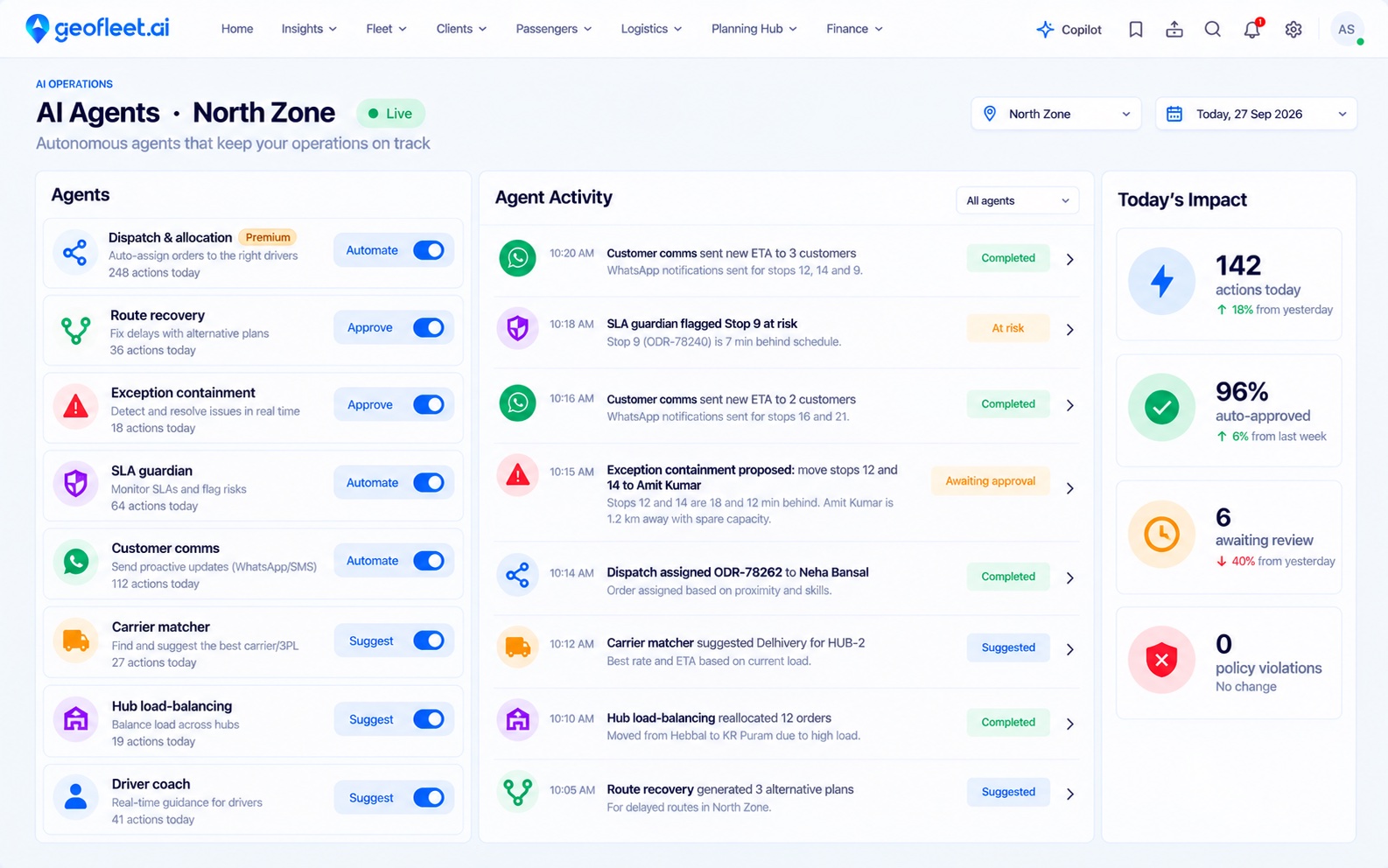
Geofleet AI agents console with the dispatch and allocation agent assigning orders to drivers in the background

Before and after Auto Allocation

Without Auto Allocation

  • A dispatcher reads every new order and picks a driver by hand, all day.
  • Drivers wait on a call or a WhatsApp message to know what is next.
  • The nearest driver gets the job even when their load is full or their next window is at risk.
  • When the fleet is full, partner carriers are called one by one.

With Auto Allocation

  • A dispatch agent matches each order the moment it lands and offers it in the driver app.
  • Drivers accept on the phone; a decline sends the job to the next best driver automatically.
  • Capacity, vehicle type, skills, time windows and SLA risk all count, not just distance.
  • Own fleet and partner carriers are weighed in the same decision, by cost and ETA.

A closer look

Auto Allocation, in the product

Match

An agent picks the driver, like a ride-hailing app picks yours

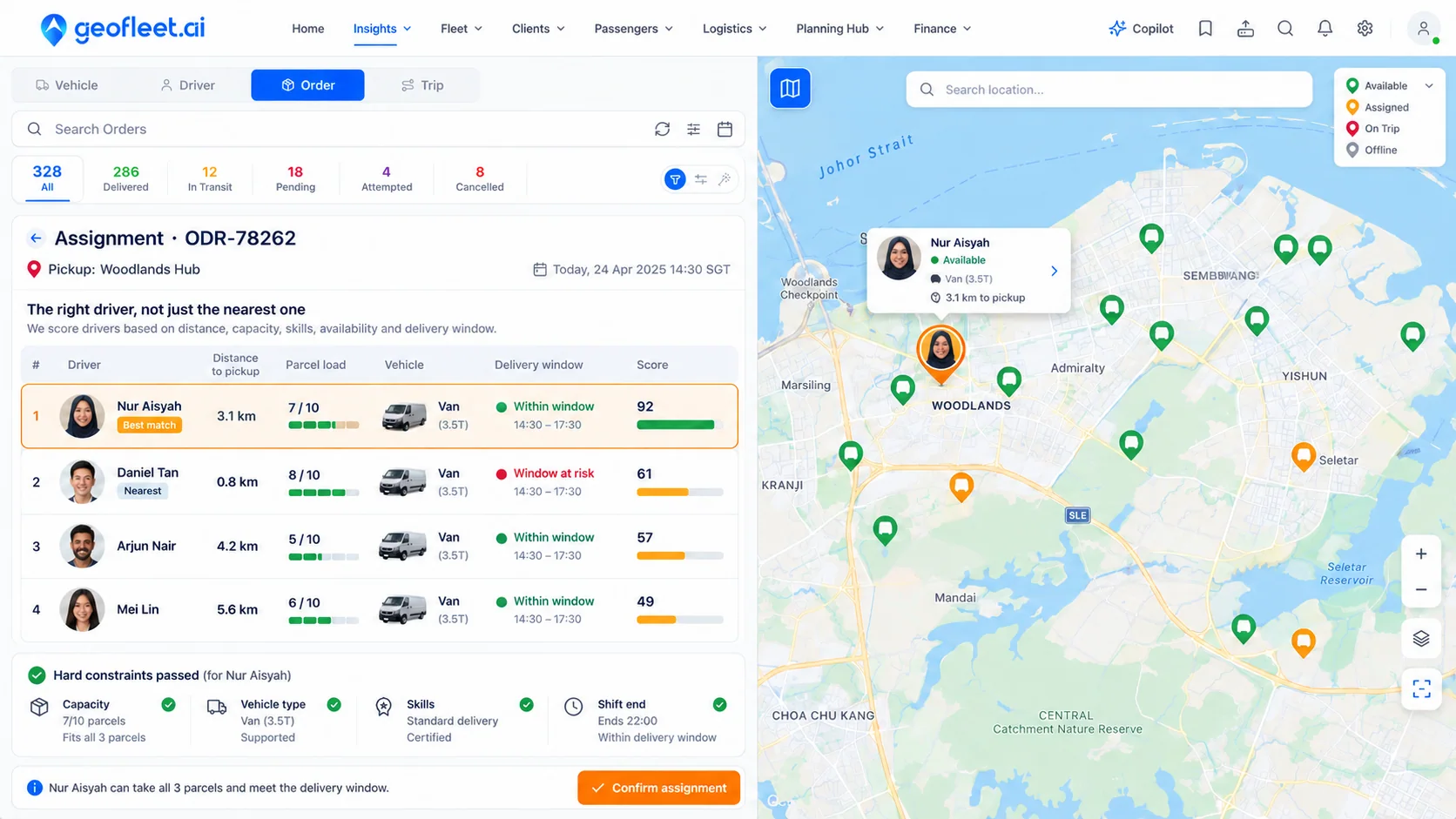
The dispatch agent runs continuously in the background. When an order arrives it filters out drivers who cannot take it, then scores the rest on detour, current load, lateness risk on their existing stops and load balance across the fleet. The best driver gets the offer in seconds. A driver 800 m away with a window at risk loses to one 3 km away with slack.

  • Hard constraints: capacity, vehicle type, skills, shift end
  • Weighted score: detour, SLA risk, fairness across drivers
  • Rules come from the hub’s Planning Profile, so each hub can differ
Geofleet assignment panel ranking four drivers by distance, parcel load, vehicle, delivery window and score, with the best match 3.1 km away chosen over the nearest driver

Offer

Drivers accept on the phone, nobody waits on a call

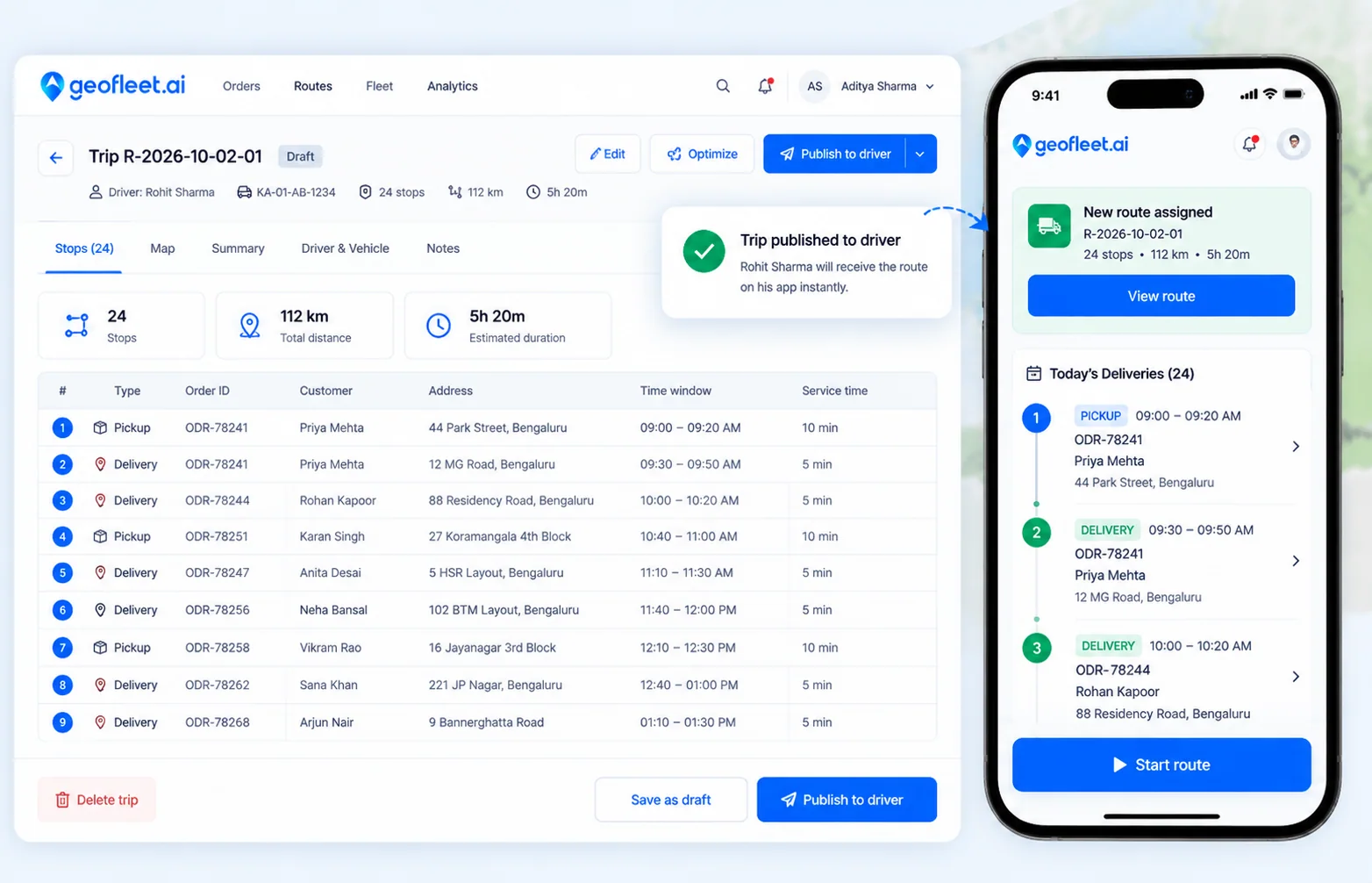
The matched driver sees the job in the driver app with the pickup, drop, window and payout, and accepts it there. If they decline or go offline, the agent re-runs the match and the job moves to the next best driver. Dispatchers do not touch the happy path at all.

  • Job offer with pickup, drop, window and payout in the driver app
  • Decline or offline triggers an instant re-match
  • Partner carriers quoted alongside your fleet when it is full or cheaper
An order matched by the dispatch agent arriving in the driver app with today’s deliveries and a Start route button

Rebalance

Re-matched on every event, all day

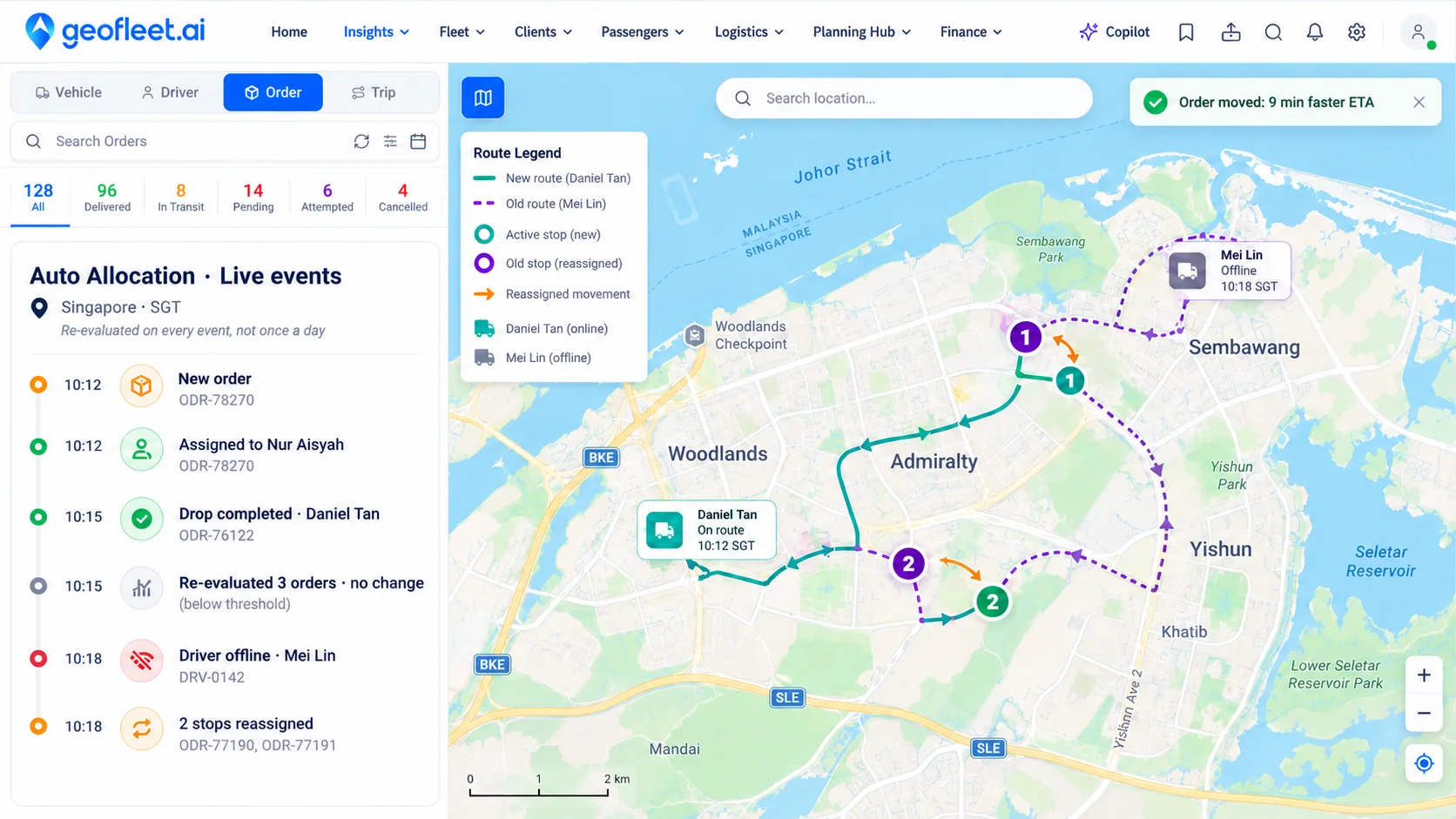
A completed drop frees capacity. A driver going offline releases their stops. An SLA countdown crossing a threshold prompts the agent to look for a better driver before the order is late, not after. An assigned order only moves when the new option is materially better, so drivers and customers are not churned by marginal gains.

  • Event-driven: new order, completed drop, driver status, SLA risk
  • Minimum-improvement threshold prevents reassignment churn
  • Hub load-balancing and SLA guardian agents work alongside on Enterprise
Geofleet Auto Allocation live events feed showing a new order assigned, a drop completed, a re-evaluation with no change, a driver going offline and two stops reassigned on the map

Escalate

Humans only see the exceptions

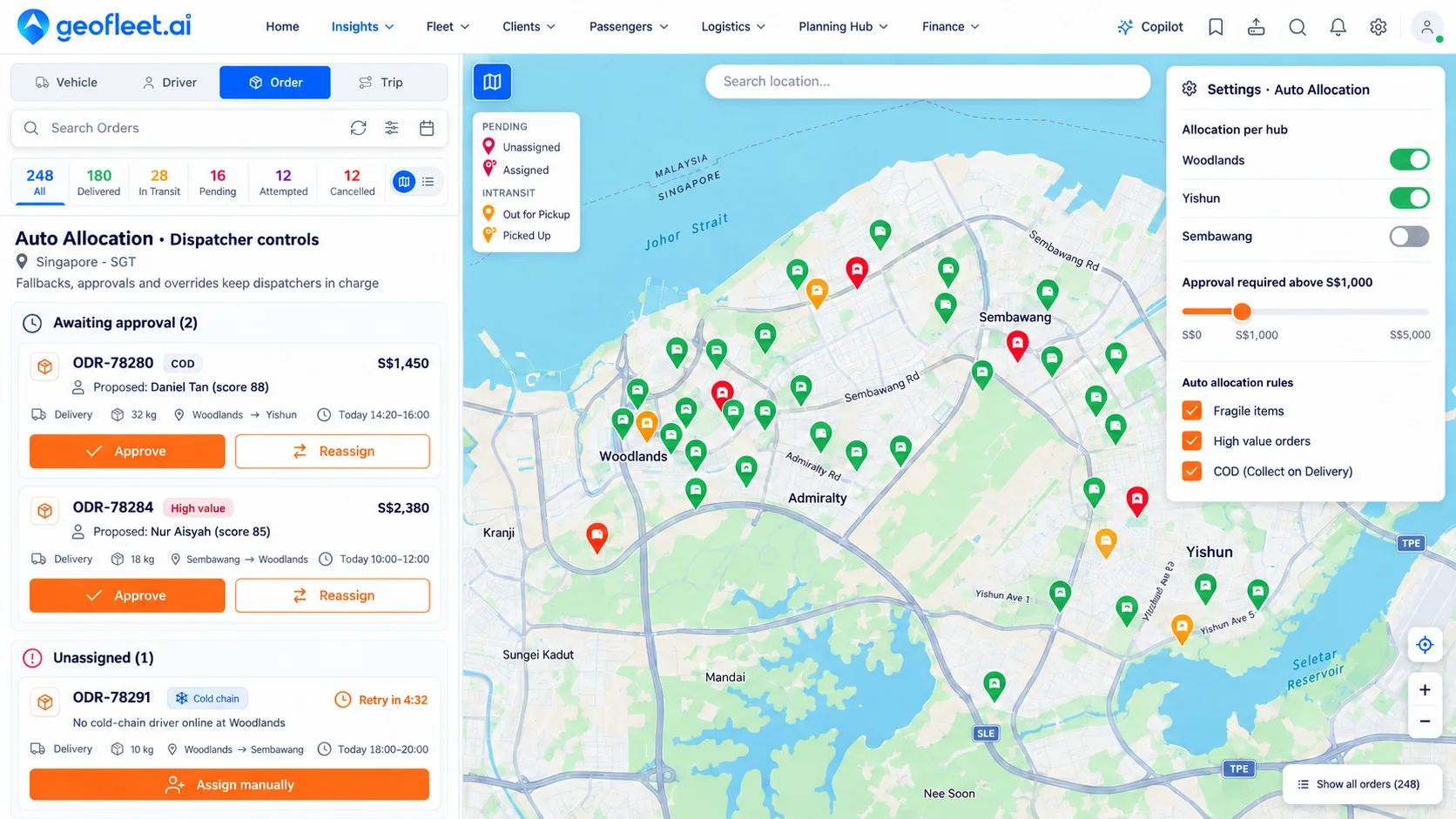
Orders nobody qualifies for go to a queue with a reason, a retry timer and an alert to the dispatch tower. High-value, high-COD or fragile orders can be proposed rather than assigned. When a dispatcher steps in, they search for the order or the driver, drag the order onto a driver on the list or the map, or open it and pick from the drivers the system ranks for it. Every decision, by agent or human, is logged with its score and the alternatives.

  • Search any order or driver by ID, name, customer or area
  • Drag and drop an order onto a driver; the system suggests the best drivers, ranked, when you assign manually
  • Switch the map to 2.5D or 3D to see vehicles, orders and buildings in context while you work
  • Approval thresholds by order value, COD amount or tag, with a decision trace for every assignment
Geofleet dispatcher controls for Auto Allocation with orders awaiting approval, an unassigned cold-chain order with a retry timer, per-hub toggles and an approval threshold

3 steps

How it works

  1. Step 1

    Order lands

    From your store, API, sheet or a dispatcher, the order enters the queue with its window, size and requirements. The agent is already watching.

  2. Step 2

    Agent matches and offers

    Eligible drivers are filtered and scored in seconds; carriers are quoted alongside. The best driver gets the job in the app and accepts it there.

  3. Step 3

    Dispatchers handle the rest

    Declines re-match automatically. Only unassignable orders and ones above your approval threshold reach a person, who searches, drags the order onto a driver or picks from the ranked suggestions.

See where Auto Allocation fits in the full flow on the How it works page.

Capabilities

Everything in Auto Allocation

  • Always-on dispatch agentAI

    Watches the order queue around the clock and matches each order the moment it arrives.

  • Scored matchingAI

    Capacity, vehicle type, skills, detour, time windows and SLA risk weighed together under each hub’s Planning Profile, not nearest-driver.

  • Offer and accept in the app

    Drivers see pickup, drop, window and payout and accept on the phone. A decline re-matches instantly.

  • Event-driven re-matching

    Runs on each new order, completed drop, driver status change or SLA risk threshold.

  • Fleet and carriers together

    Third-party carriers are quoted in the same decision as your own drivers, by cost and ETA.

  • Search orders and drivers

    Find any order or driver by ID, customer, name or area and see its status, position and assignment.

  • Drag-and-drop assignmentAI

    Drag an order onto a driver on the list or the map. The system ranks the best drivers for it as you assign, and flags any constraint the pick violates.

  • 2.5D and 3D map mode

    Tilt the live map into 2.5D or full 3D to see vehicles, orders and buildings in context. Switch back to flat 2D with one click.

  • Approval thresholds

    Orders above a value, COD amount or with a tag are proposed to a dispatcher instead of assigned.

  • Decision trace

    Every match records the score, the alternatives and who approved it, for audit and tuning.

What changes with Auto Allocation

  • Seconds

    From order to offer

    The agent matches the moment the order lands, not when a dispatcher gets to it.

  • Zero

    Calls on the happy path

    Drivers accept jobs in the app. Dispatchers only hear about exceptions.

  • Scoped

    Rollout

    Start with one hub and one order type, review the agent’s decisions, and widen as trust grows.

Works with your stack

Connects with 50+ platforms out of the box.

See all integrations
  • Driver App
  • AI Agents
  • Route Planner
  • Webhooks
  • REST API

Frequently asked questions

Is this just nearest-driver assignment?

No. Distance is one input. Current load, remaining capacity, vehicle type, skills, time-window fit, Planning Profile rules and SLA risk all feed the score, which is why the nearest driver is often not the one chosen.

What does the driver see?

The job appears in the driver app with the pickup, drop, delivery window and payout. The driver accepts it there. If they decline or go offline, the agent re-matches the order to the next best driver.

What happens when no driver qualifies?

The order goes to a visible queue with the reason, for example no cold-chain driver online at the north hub. You choose the fallback: retry on a timer, alert the dispatch tower, offer it to a partner carrier or prompt a manual assignment.

Can dispatchers still assign by hand?

Yes, at any time. Search for the order or the driver, then drag the order onto a driver on the list or the map, or open the order and choose from the drivers the system ranks for it by distance, load, vehicle, window and SLA risk. Any constraint the manual choice violates is flagged, and every manual change is recorded next to the agent’s decisions.

Is there a 3D view of the fleet?

Yes. The live map has a 2D, 2.5D and 3D mode. In 2.5D the map tilts so vehicles and stops sit against the streets; in 3D buildings are drawn in volume so a dispatcher can see which block, tower or loading bay a driver is at. Orders, driver positions, routes and drag-and-drop assignment all work in every mode.

Can we roll it out gradually?

Yes. Enable the agent per hub, per order type or per shipper, and set approval thresholds so orders above a value, a COD amount or with a tag are proposed rather than assigned. Most teams start narrow and widen weekly.

Which plan includes auto allocation?

The dispatch and allocation agent is included from the Premium plan. The full logistics agent suite, including carrier matching, hub load-balancing and SLA guardian, is on Enterprise.
Ready to try Auto Allocation?

Get started in minutes. No credit card required.