Cash-on-Delivery Tracking

Track every cash payment with real-time reconciliation

Monitor cash-on-delivery collections in real-time, detect discrepancies instantly, and automate driver cash settlements — eliminating revenue leakage.

Book a demo
Included in every planSee pricing
Cash on ground, per driver
Live
Reconciliation and settlement
Same day
Discrepancy alerts
Instant
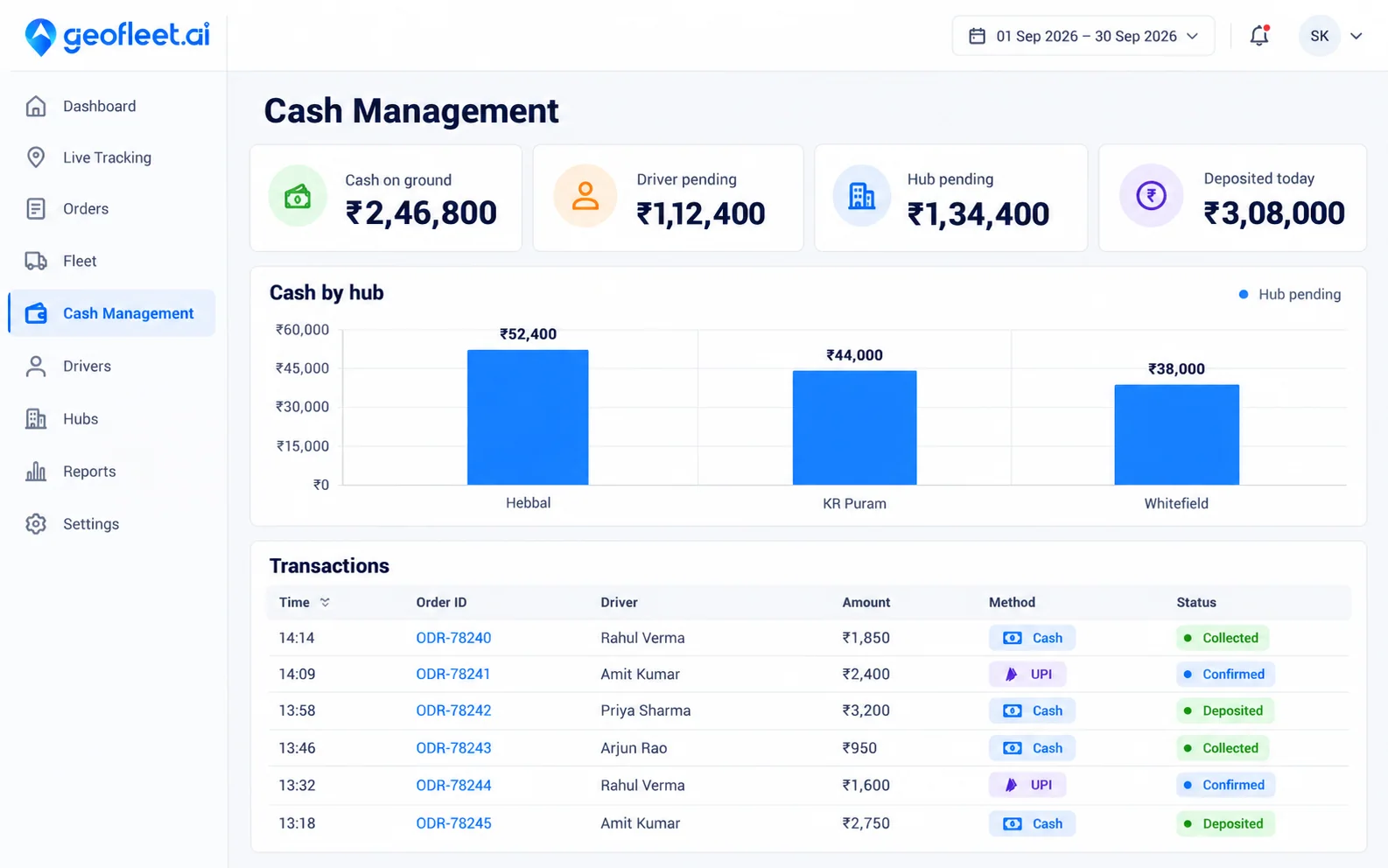
Geofleet cash management dashboard showing cash on ground, driver and hub pending amounts, cash by hub and the day’s transactions

Before and after Cash Management

Without Cash Management

  • Drivers hand over a bundle of cash at the end of the shift and someone counts it against a printed list.
  • A short deposit is noticed two days later and nobody remembers which order it was.
  • Dispatch has no idea how much cash a driver is carrying at 3 pm.
  • Accounting re-keys the day’s collections into Tally or QuickBooks by hand.

With Cash Management

  • Each cash collection is recorded in the driver app at the stop, with order ID, amount and time.
  • Cash on ground is live per driver and per hub, all day.
  • A mismatch between expected and collected raises an alert immediately.
  • End-of-shift reconciliation and the accounting export are generated, not typed.

A closer look

Cash Management, in the product

Collect

Cash is recorded at the stop, as part of the delivery

The payment step sits inside the delivery flow in the driver app. When a COD order is marked delivered the amount is recorded against it, and an OTP from the customer can be required before the payment step completes.

  • Amount, order ID and timestamp captured automatically on delivery
  • Optional OTP confirmation before the payment step
  • Digital receipt sent to the customer by SMS or email
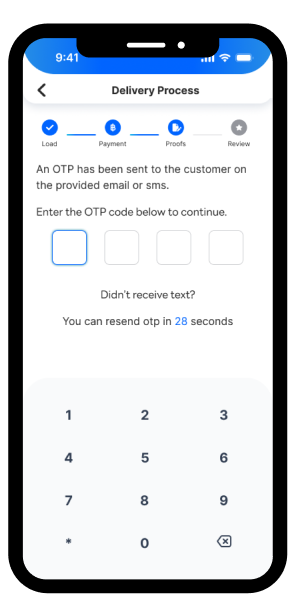
Driver app OTP verification screen used to confirm handover before the payment step

Watch

Cash on ground, by driver and by hub, all day

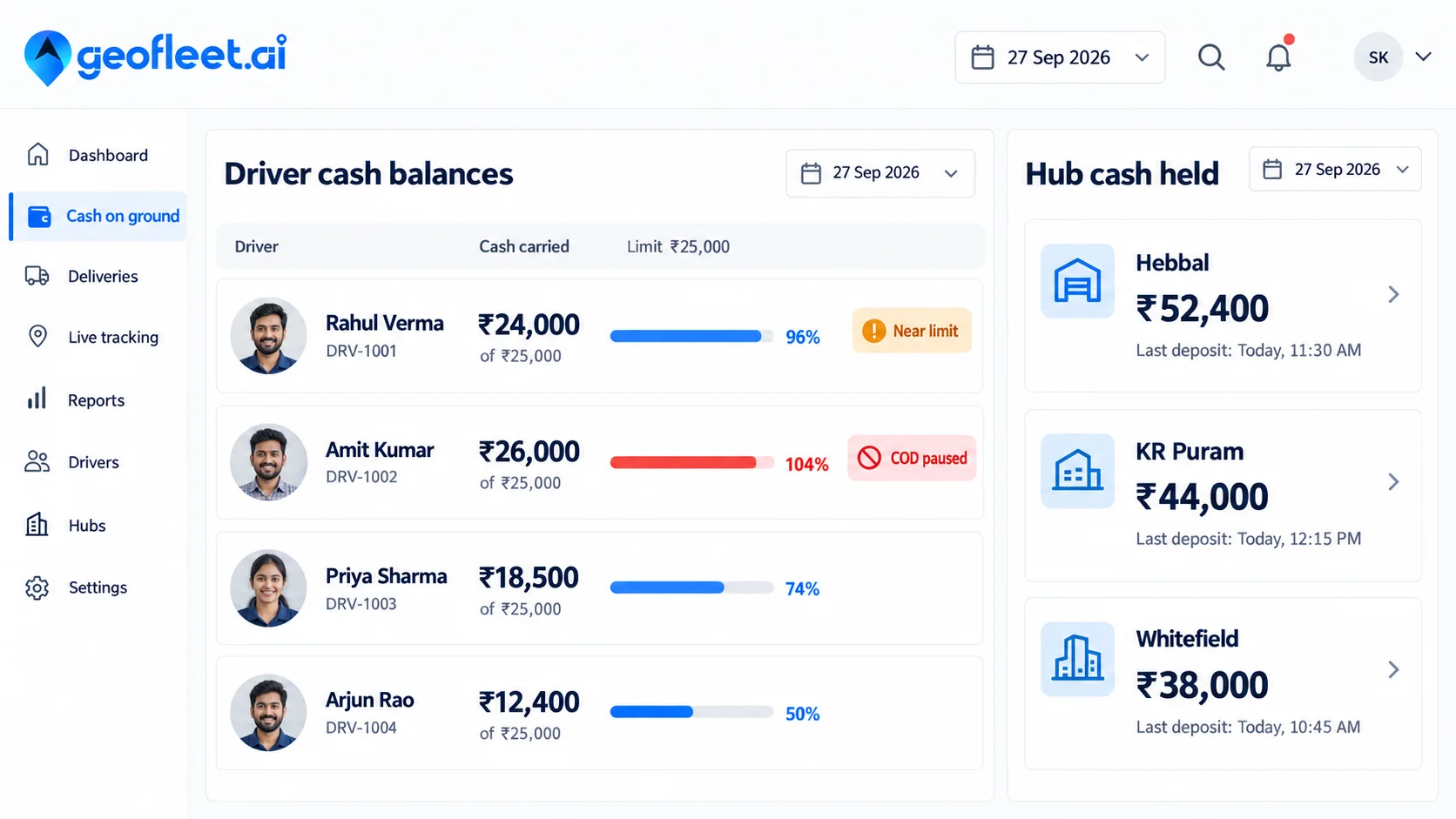
The cash dashboard shows total cash outstanding, how much each driver is carrying and what each hub is holding. Cash limits per driver trigger alerts and can pause new COD assignments until a deposit is made.

  • Live balances per driver and per hub
  • Cash-in-hand limits with alerts when reached
  • Manual entries for deposits and adjustments, with an audit trail
Geofleet cash on ground view listing each driver’s cash carried against their limit, with near-limit and COD paused flags, beside cash held per hub

Settle

Reconcile the shift and export to your books

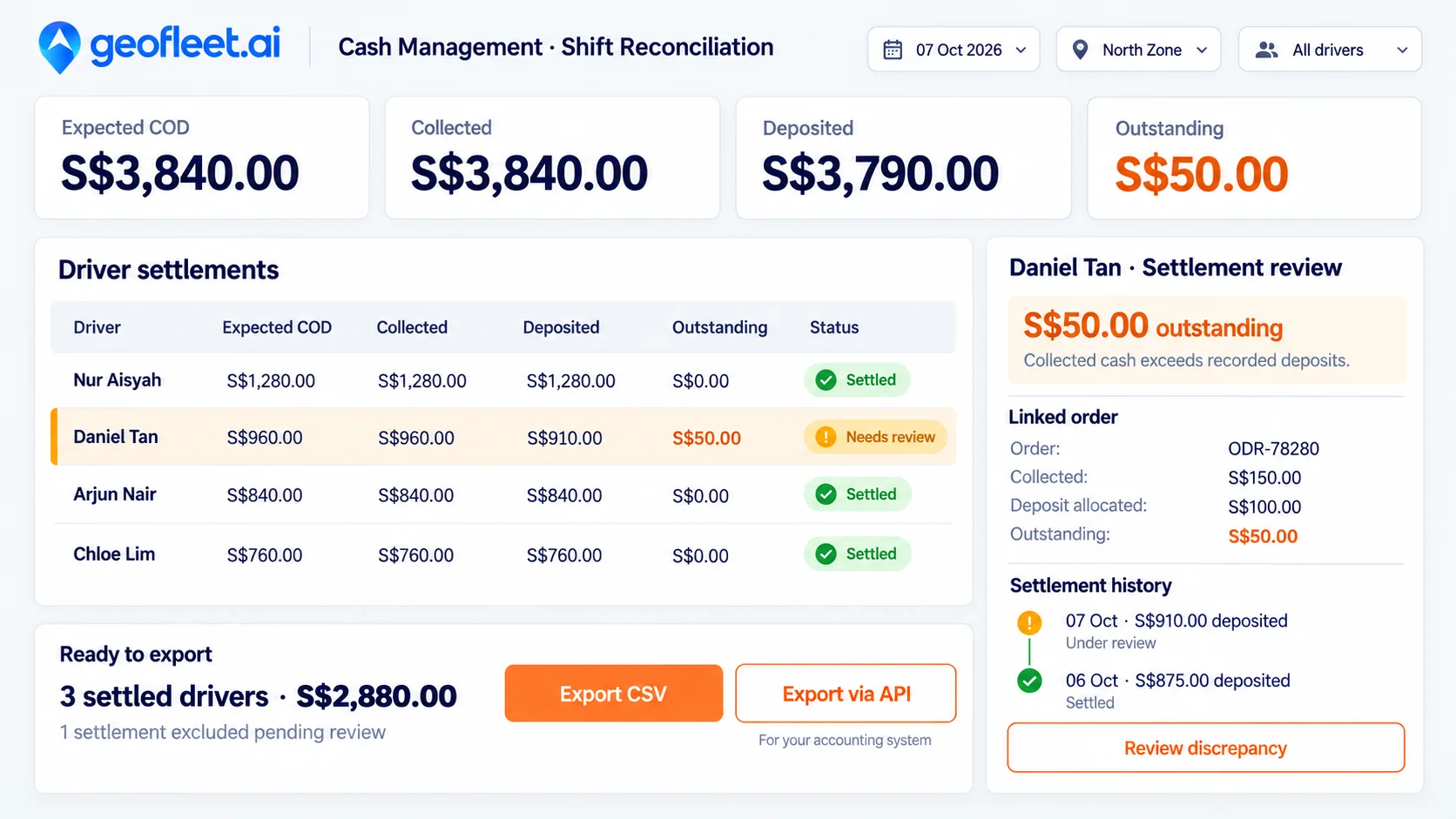
At the end of the shift, collections are compared with orders and deposits automatically. Discrepancies are listed per driver with the orders behind them, and the settled totals export to your accounting system by CSV or API.

  • End-of-shift report comparing orders, collections and deposits
  • Settlement history and outstanding balances per driver
  • Export to Tally, QuickBooks, Zoho Books or any system via CSV or API
Geofleet shift reconciliation with expected, collected, deposited and outstanding cash per driver, one settlement flagged for review, and Export CSV and Export via API buttons

3 steps

How it works

  1. Step 1

    Driver collects cash

    The app records each COD collection with amount, order ID, and timestamp.

  2. Step 2

    Real-time tracking

    Dispatchers see live cash balances per driver throughout the day.

  3. Step 3

    Automated settlement

    End-of-day reconciliation and settlement reports generated automatically.

See where Cash Management fits in the full flow on the How it works page.

Capabilities

Everything in Cash Management

  • Live cash balances

    See how much cash each driver is carrying in real-time.

  • Discrepancy alertsAI

    AI flags mismatches between collected and expected amounts instantly.

  • Auto-reconciliation

    End-of-shift reports comparing orders, collections, and deposits.

  • Settlement tracking

    Track driver deposits, outstanding balances, and settlement history.

  • Digital receipts

    Customers get digital receipts for cash payments via SMS or email.

  • Cash limits

    Set maximum cash-in-hand limits per driver with alerts when reached.

  • Payment analytics

    COD vs digital payment ratios, collection rates, and settlement trends.

  • Accounting export

    Export to Tally, QuickBooks, Zoho, or any accounting system via CSV/API.

What changes with Cash Management

  • Live

    Cash visibility

    Every amount collected is tracked from the stop to the deposit, per driver and per hub.

  • Same day

    Reconciliation

    Automated reports replace hours of end-of-shift counting and spreadsheet work.

  • Instant

    Discrepancy alerts

    Mismatches surface while the driver is still on shift, not at month end.

Frequently asked questions

How does the driver record cash collections?

When a COD order is marked delivered, the app automatically records the amount. Drivers can also manually adjust if needed.

Can I set cash-in-hand limits?

Yes. Set maximum cash limits per driver. The system alerts dispatchers and can pause new COD assignments when limits are reached.

Does it integrate with accounting software?

Yes. Export to Tally, QuickBooks, Zoho Books, and others via CSV or API integration.

What happens when collected cash does not match the orders?

The shift report lists the discrepancy per driver with the orders behind it, and an alert goes to the dispatcher. Deposits and adjustments are recorded with an audit trail.

Can cash be recorded without mobile signal?

Yes. The payment step works offline in the driver app and syncs when the device reconnects, so balances catch up automatically.

Which plan includes cash management?

Cash on delivery management is included on every plan: Geofleet Lite, and Geofleet Command from Professional.

Ready to try Cash Management?

Try Geofleet Lite free for 7 days, or set up Geofleet Command for a larger fleet.

Book a demo