How it works

How Geofleet works: order in, proof of delivery out

Geofleet is delivery management software. You bring orders in from a CSV, your store, or an API. Geofleet plans optimized routes and sends them to drivers’ phones. From there you track every stop live, text customers a tracking link, and collect photo, signature, or OTP proof of delivery. It all runs from one command centre, and an AI Copilot answers questions about the same live data.

  • Free plan: 300 orders/month, 10 drivers
  • Driver app works offline
  • No app install for customers
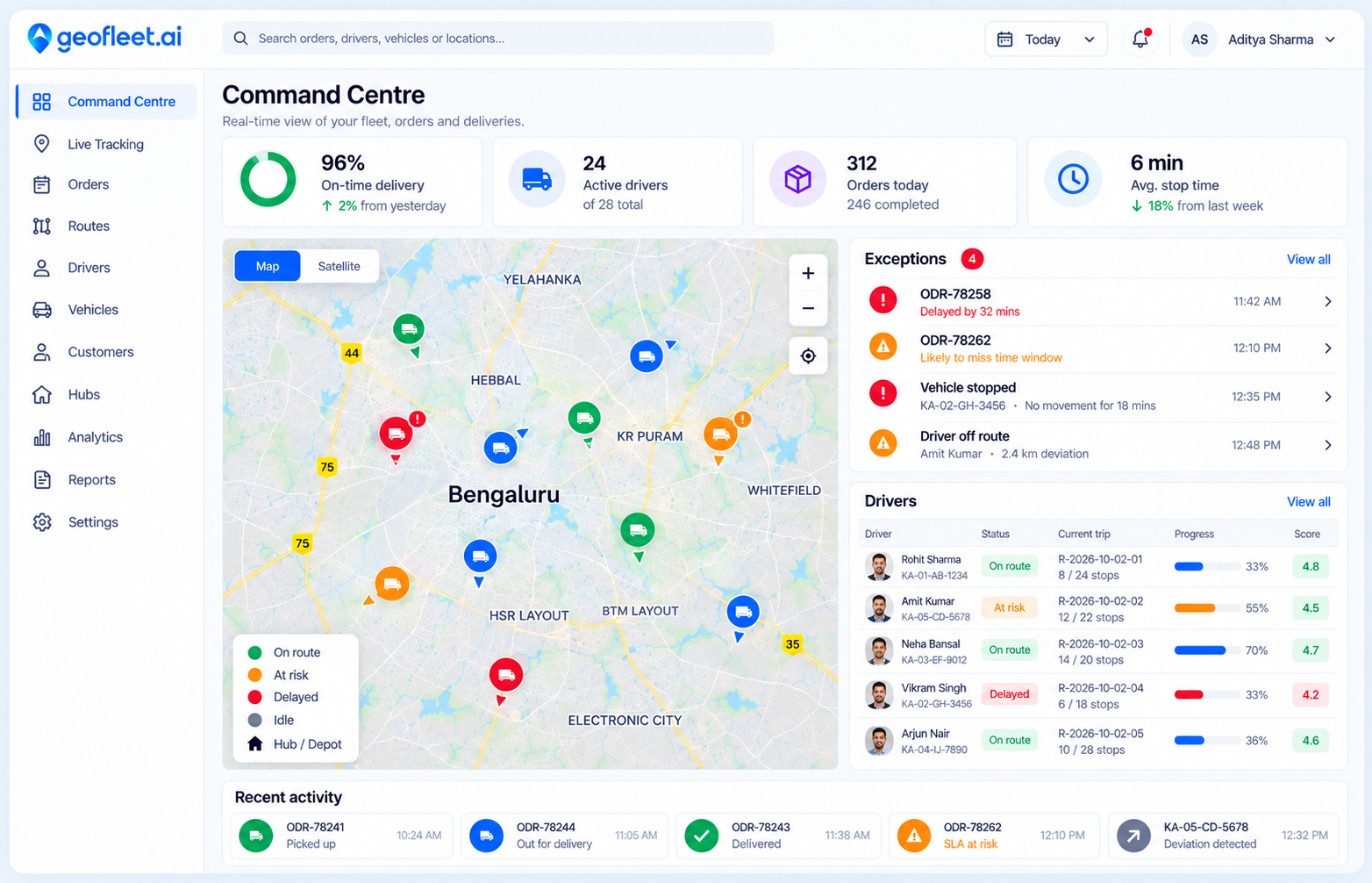
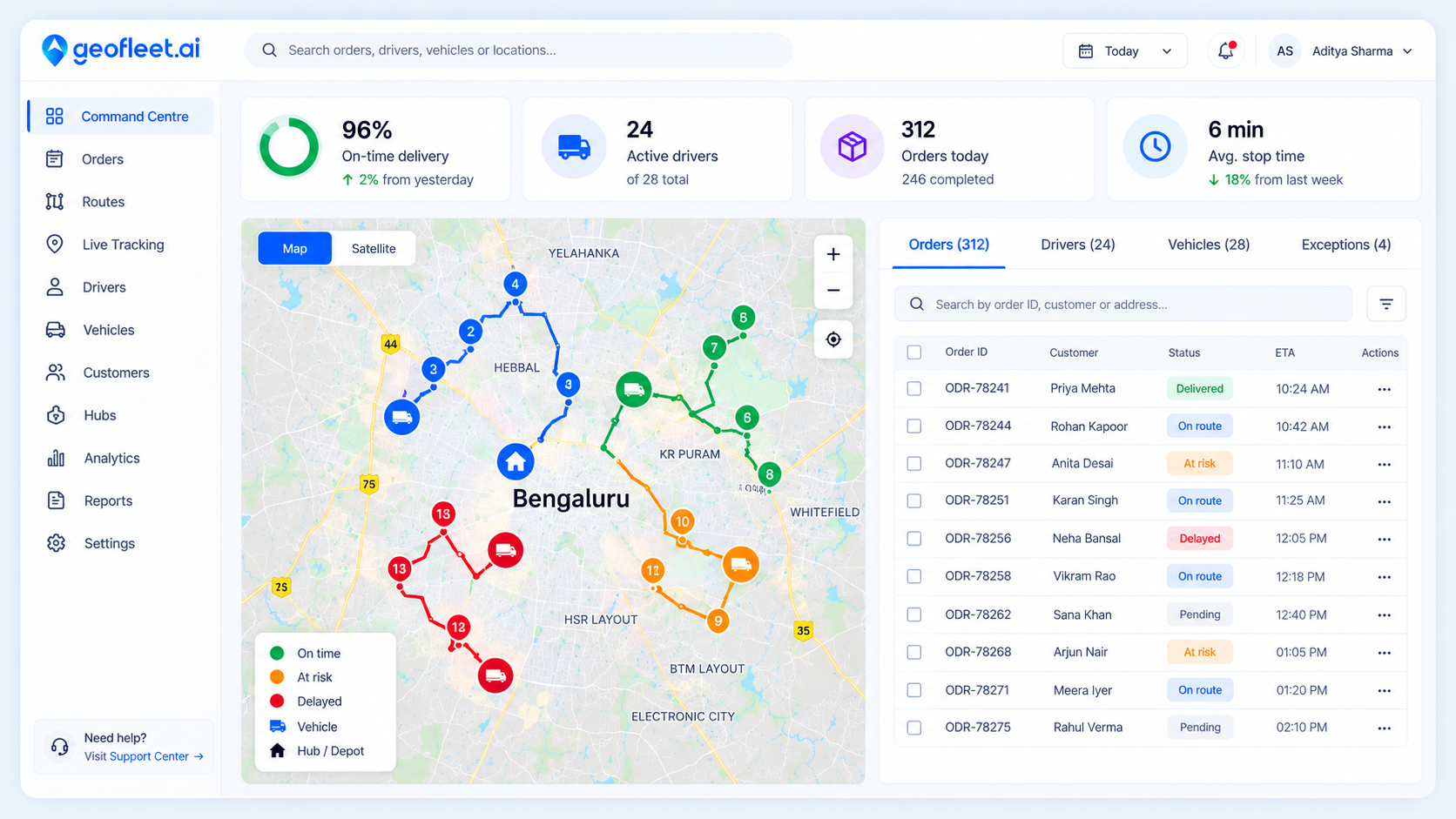
Geofleet command centre with live map, KPIs and order list

The delivery lifecycle

Six steps from order to proof of delivery

Every order goes through the same six steps in Geofleet, whether you run 5 drivers or 500.

  1. Step 1

    Bring your orders in

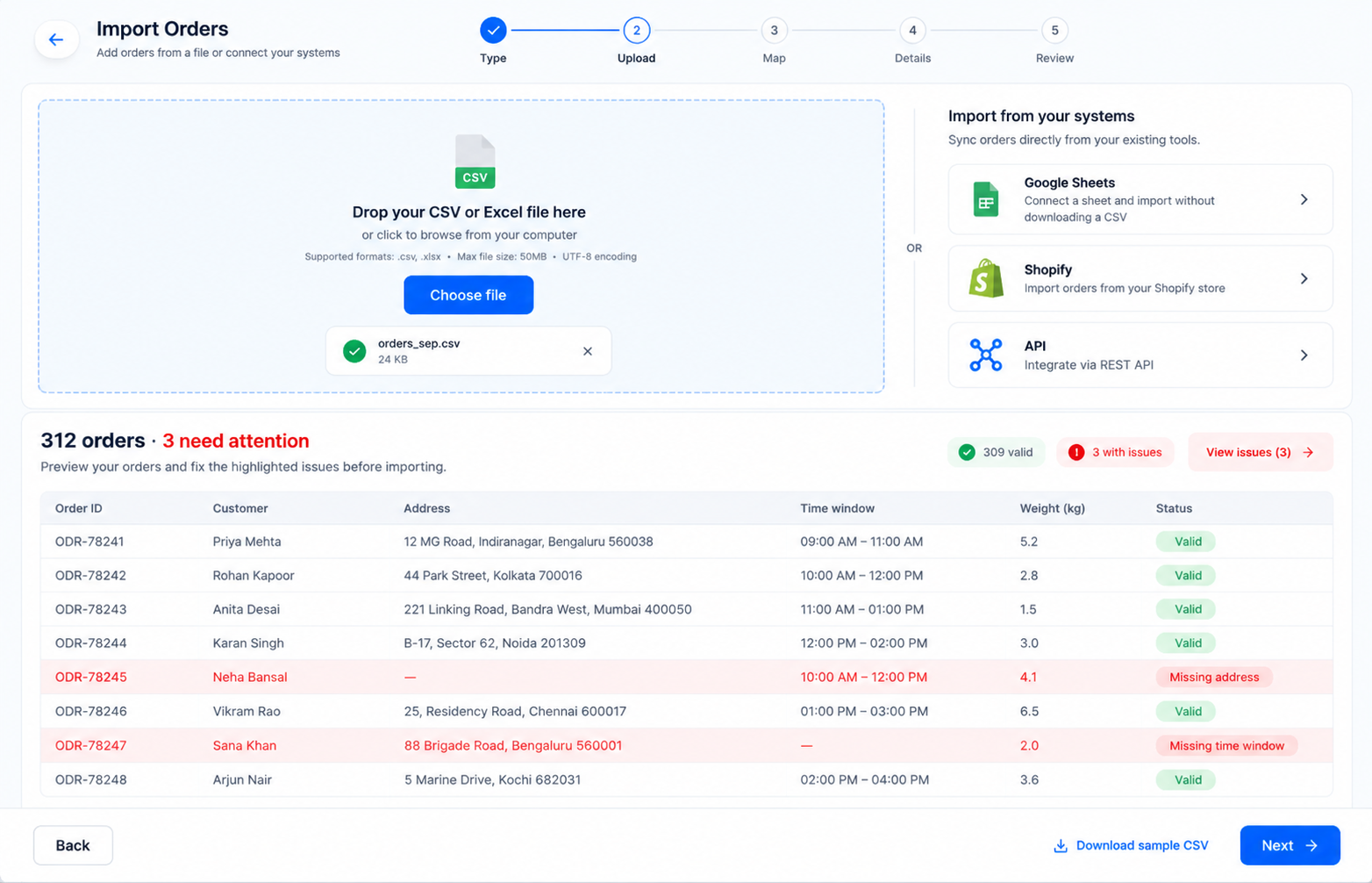
    Upload a CSV or spreadsheet, sync orders automatically from Shopify and other OMS platforms, push them over the API or MCP, or add them by hand. Addresses are geocoded on import so they are ready to route.

    • CSV and spreadsheet templates
    • Shopify, Unicommerce and 10+ OMS integrations
    • REST API and MCP for your own systems
    See integrations
    Uploading a CSV of delivery orders into Geofleet
  2. Step 2

    Plan optimized routes

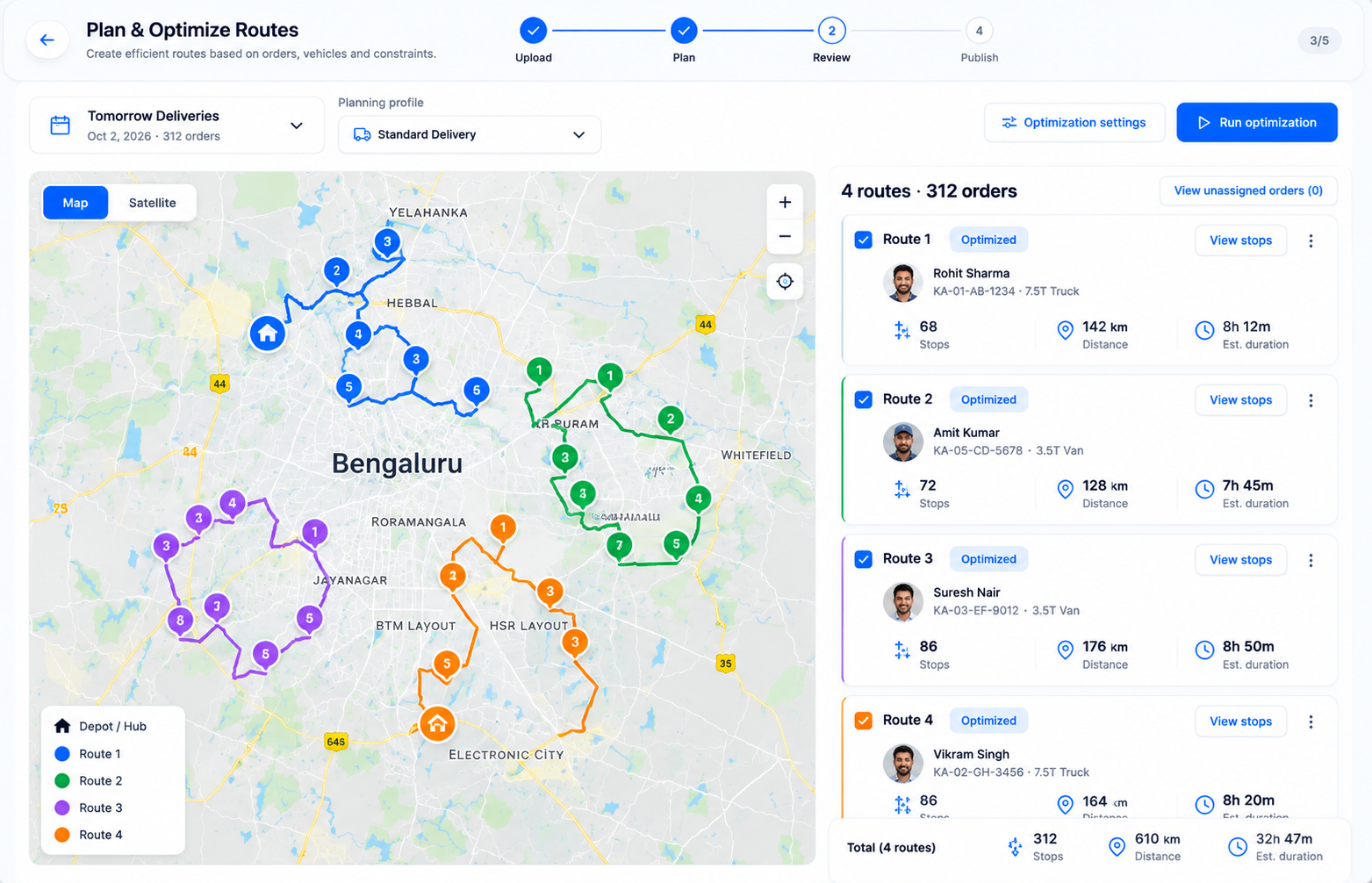
    Pick a planning profile, such as “Tomorrow Deliveries”, and generate a smart plan. The route engine accounts for time windows, vehicle capacity, traffic and driver workload, then groups stops into trips.

    • Time windows and shift limits
    • Weight, volume and item capacity
    • Balanced workloads across drivers
    Route planner
    Geofleet Smart Planning generating optimized routes from a planning profile
  3. Step 3

    Dispatch to drivers

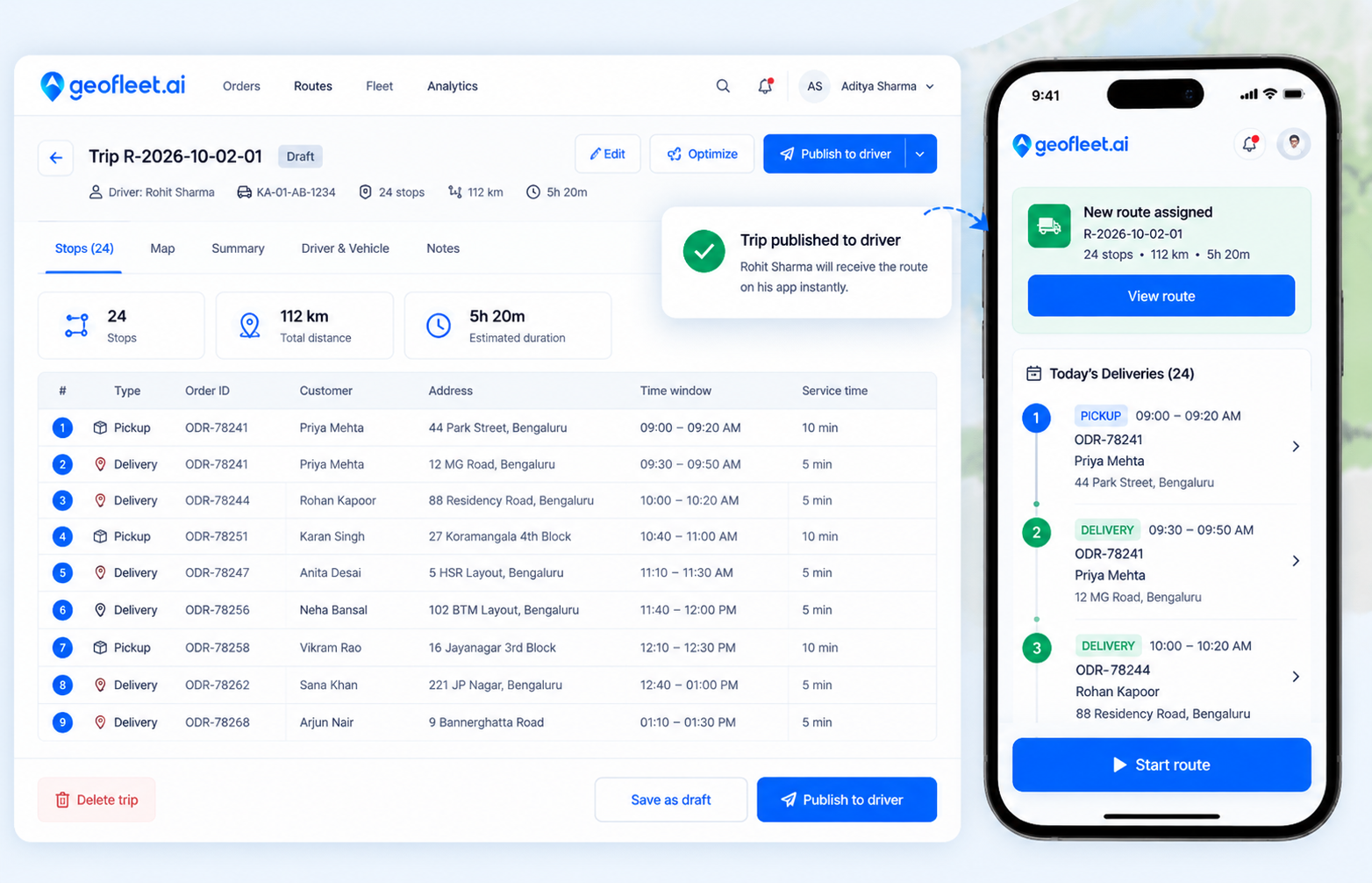
    Review each trip’s distance, duration and order count, then publish it. The route arrives in the driver app with turn-by-turn navigation. On Premium, AI auto-dispatch and auto-allocation assign trips for you.

    • One-click publish to the driver app
    • Works offline and syncs on reconnect
    • AI auto-dispatch on Premium
    Driver app
    A published trip being dispatched to a driver in Geofleet
  4. Step 4

    Track live and adjust

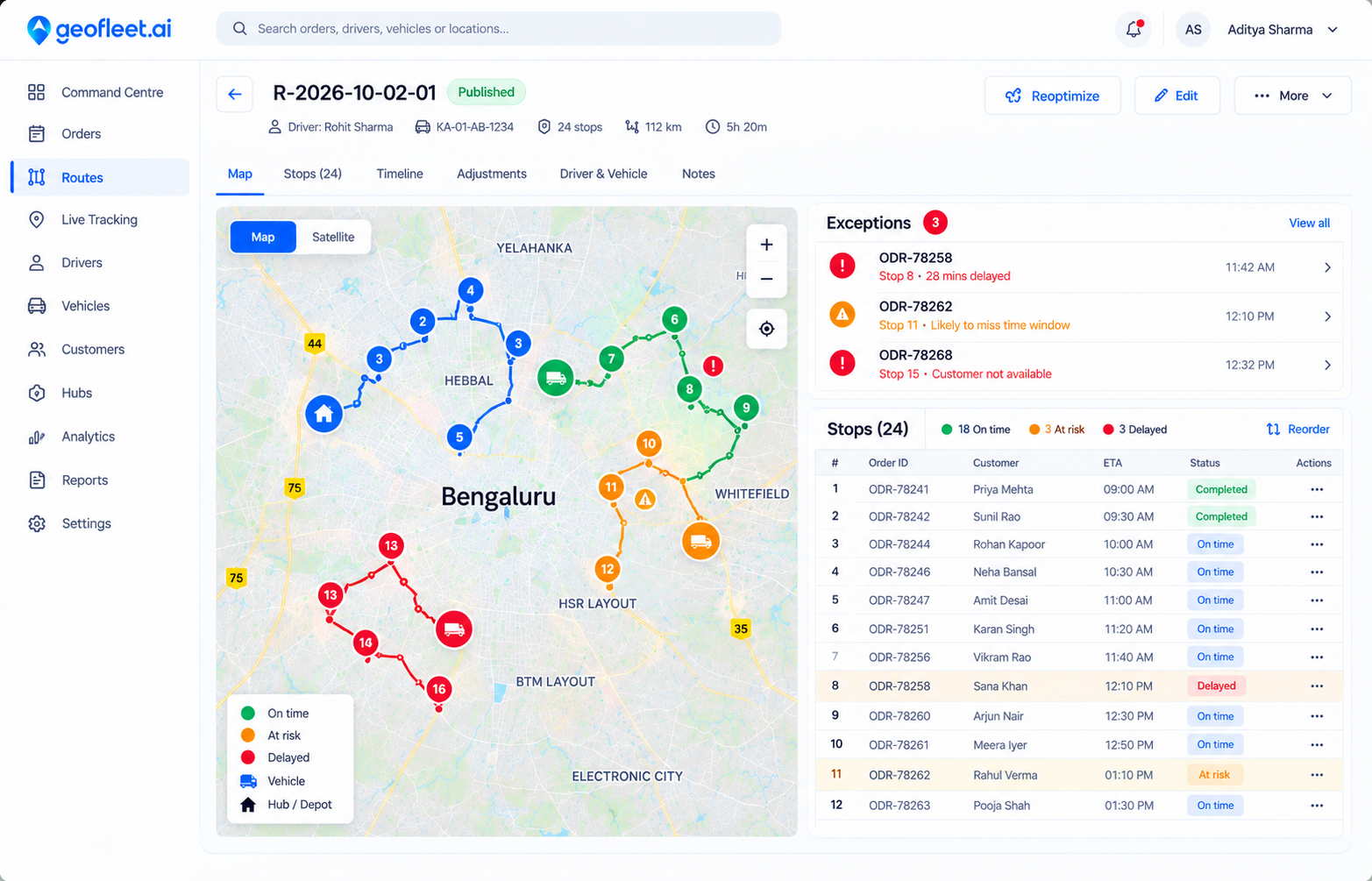
    Every vehicle and stop is on one live map. Late or at-risk stops move to the top of the queue. You can resequence stops, reassign orders or add a stop mid-route, and the driver’s app updates right away.

    • Live map with planned vs actual route
    • Exceptions and SLA risk surfaced first
    • Drag-and-drop resequencing
    Reports & analytics
    Resequencing delivery orders on a live route map in Geofleet
  5. Step 5

    Keep customers informed

    Customers get a tracking link by SMS, email or WhatsApp. It opens in any browser and shows live status, ETA and the driver on a map, so they don’t need to install anything. On Premium, the page carries your own branding.

    • Automatic updates at key milestones
    • Live ETA and driver contact
    • Branded tracking page on Premium
    Branded tracking
    A customer following a live Geofleet delivery tracking link on their phone
  6. Step 6

    Prove delivery and measure

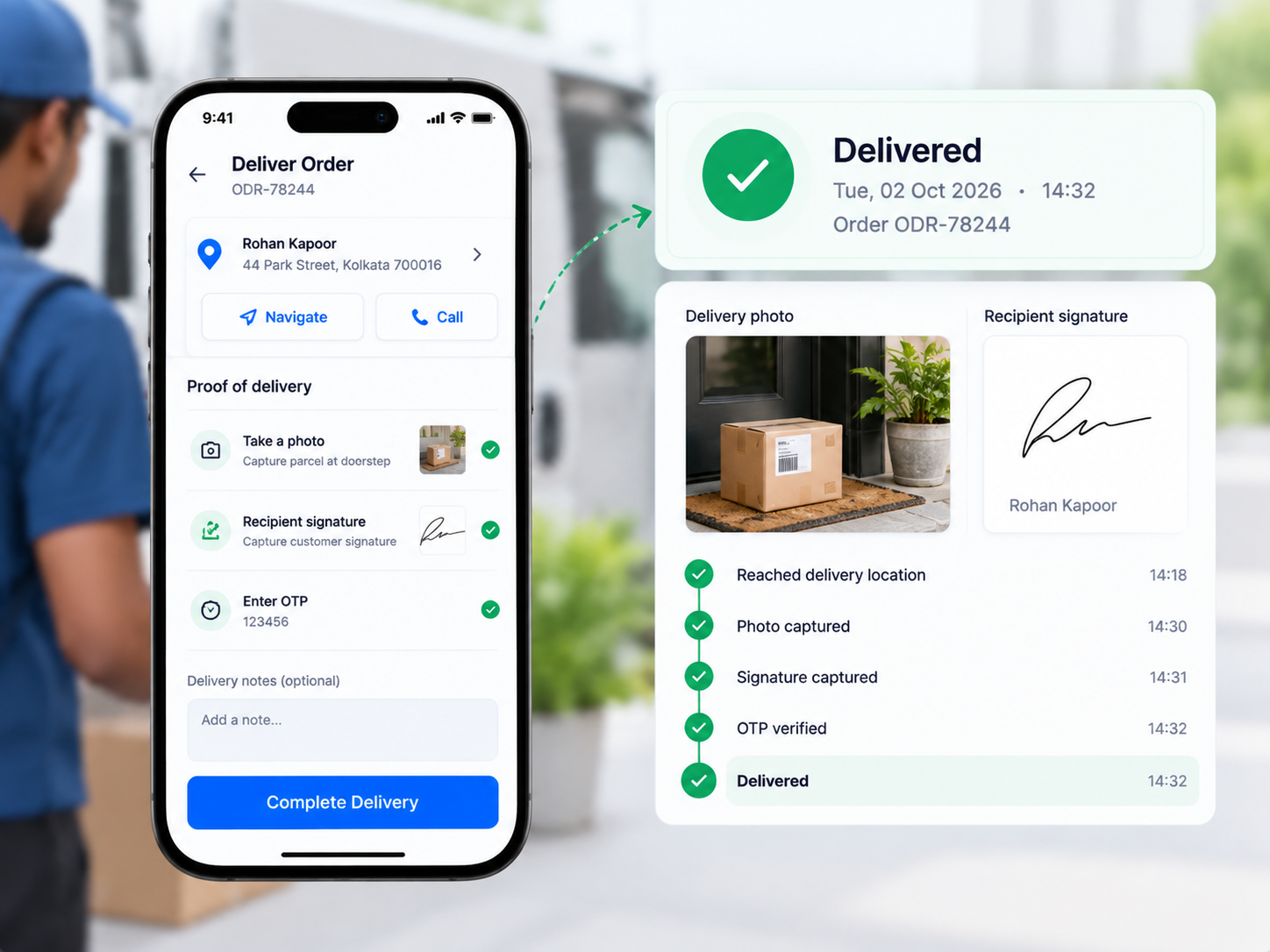
    Drivers capture a photo, e-signature, OTP or barcode scan at the door. Each proof is timestamped and geotagged. Results feed on-time rate, cost per drop and driver scorecards, so you can see what to fix tomorrow.

    • Photo, signature, OTP and barcode
    • Searchable, exportable proof records
    • On-time, cost-per-drop and driver KPIs
    Proof of delivery
    Driver capturing photo proof of delivery in the Geofleet driver app

Where you run it

One command centre, with Copilot built in

All six steps happen in one place. The command centre is the live view of your operation. Copilot is an AI assistant that reads the same data and can act on it within your permissions.

Geofleet command centre — live map and operations view

Command centre

Orders, drivers, the live map, ETAs and exceptions on one screen, so the next action is obvious.

  • Bring data in your way

    Integrations, MCP, CSV templates or manual entry, all landing in the same order list.

  • Plan, assign and adapt

    Reassign, resequence, inject stops and run bulk updates within role and policy guardrails.

  • One map, prioritized queues

    Exceptions rise to the top, and each role sees its own slice: dispatch, hub leads or partners.

  • Measure and audit

    On-time rate, cost per drop and scorecards, with a full record of who changed what and when.

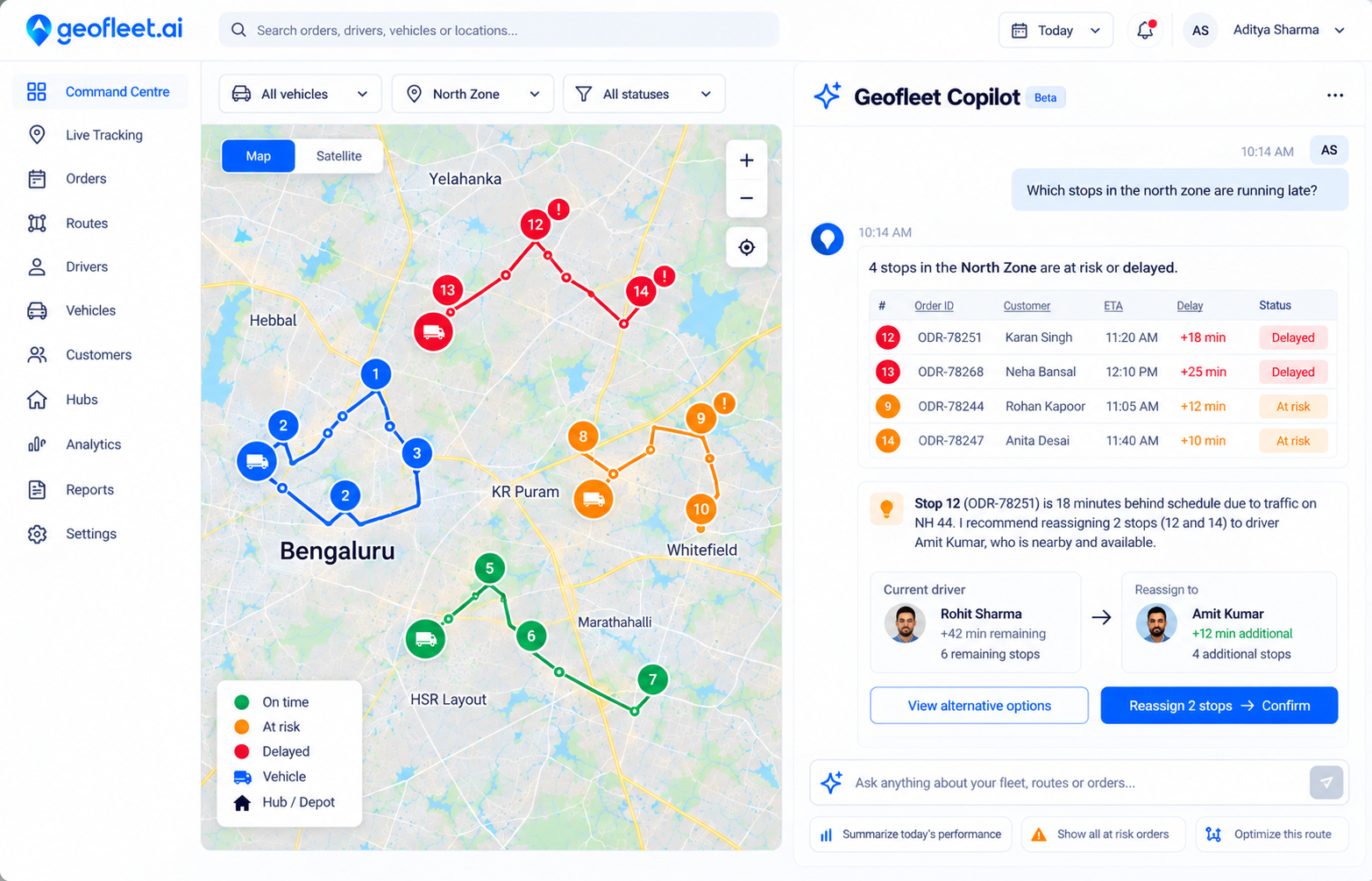
Geofleet Copilot answering a dispatch question next to a live route

Copilot

Ask about your operation in plain language. Answers come from live data, not generic AI text.

  • Ask in plain language

    “Which stops in the north zone are running late?” or “What changed since 09:00?”

  • Operational answers

    Filtered lists, comparisons and summaries for dispatch, routing and exceptions.

  • Suggested actions, with guardrails

    Copilot proposes reroutes or bulk updates for you to confirm. It cannot do anything your role can’t.

  • Faster onboarding

    Guided prompts to set up hubs, integrations and workflows without spreadsheet choreography.

FAQ

Questions about how Geofleet works

How does Geofleet work?

Geofleet takes delivery orders from a CSV, your store or an API and plans optimized routes. It dispatches those routes to a driver app, tracks each stop live and sends customers a tracking link. At the door, drivers capture photo, signature or OTP proof of delivery. Dispatchers run everything from one command centre, with an AI Copilot for questions and bulk actions.

How do I get my orders into Geofleet?

There are four ways. You can upload a CSV or spreadsheet, connect an OMS or store such as Shopify or Unicommerce so orders sync automatically, send orders through the REST API or MCP, or add them manually. You can mix methods: many teams start with CSV and add an integration later.

Do drivers need to install an app?

Yes. Drivers use the Geofleet driver app to receive routes, navigate, capture proof of delivery and record attendance. The app works offline and syncs when the phone reconnects.

Do customers need to install anything to track a delivery?

No. Customers get a tracking link by SMS, email or WhatsApp that opens in any browser. It shows live status, ETA and the driver’s location.

Can Copilot change orders or routes on its own?

Only within the permissions you set. Copilot follows role-based access, so it can only do what the signed-in user is allowed to do. It proposes actions such as reroutes or bulk updates for you to confirm.

How much does Geofleet cost to try?

The Free plan covers up to 300 orders a month and 10 drivers with no card required. Professional is $19 and Premium is $29 per driver per month, billed quarterly. Professional has a 14-day free trial.

See your own orders move through it

Start on the Free plan with a CSV of real orders, or book a demo and we’ll walk through your workflow.