Quick answer
To plan delivery routes for a small business: collect every order for the wave, group them into zones around your hub, give each driver one or two neighbouring zones within a stop limit, put booked time slots first, order the stops so the route loops away from and back to the hub, then share each route with its driver. Route planning software does the grouping and ordering in one step once you pass about 20 stops a wave.
Before you plan: three decisions
- Waves: when routes leave the hub, for example 11:00 and 16:00, and the order cutoff for each.
- Stop limit: the most stops one driver can do in a wave on their vehicle, such as 12 on a bike or 20 in a van.
- Windows: which orders have a booked delivery slot that must be kept, and which can arrive any time in the wave.
How to plan routes by hand
- Draw four to six zones around your hub on a map, using main roads or rivers as edges, and name them.
- Tag every order in the wave with its zone.
- Count orders per zone and give each driver one zone, or two neighbouring ones, without going over their stop limit.
- Inside each route, put orders with an early booked slot first.
- Order the rest so the driver moves away from the hub in one direction and comes back another way, without crossing their own path.
- Send each driver their list in stop order, with phone numbers and any cash to collect.
This works well up to about 20 stops per wave. Beyond that, the zone counts stop balancing neatly, windows start to clash, and the hand method takes longer than the first delivery.
Common route planning mistakes
Planning order by order
- What happens
- Drivers cross the same area several times
- Fix
- Plan the whole wave at once
No stop limit
- What happens
- One route finishes hours after the others
- Fix
- Set a limit per driver and vehicle
Ignoring booked slots
- What happens
- Customers who booked a time are kept waiting
- Fix
- Place windowed stops first
Routes that do not return
- What happens
- Drivers end far from the hub before the next wave
- Fix
- Plan loops that finish near the hub
Wrong pickup point
- What happens
- Every ETA is a few minutes off
- Fix
- Set the hub pin on the entrance drivers use
| Mistake | What happens | Fix |
|---|---|---|
| Planning order by order | Drivers cross the same area several times | Plan the whole wave at once |
| No stop limit | One route finishes hours after the others | Set a limit per driver and vehicle |
| Ignoring booked slots | Customers who booked a time are kept waiting | Place windowed stops first |
| Routes that do not return | Drivers end far from the hub before the next wave | Plan loops that finish near the hub |
| Wrong pickup point | Every ETA is a few minutes off | Set the hub pin on the entrance drivers use |
What route planning software adds
A route planner does the zone and sequence steps together, across all drivers, in seconds. It also handles what is hard by hand: balancing work between drivers, keeping every stop inside its window, and recalculating when an urgent order arrives. Choose a planner that starts from your hub and lets you adjust the result, because no algorithm knows that a customer’s building has a back entrance.
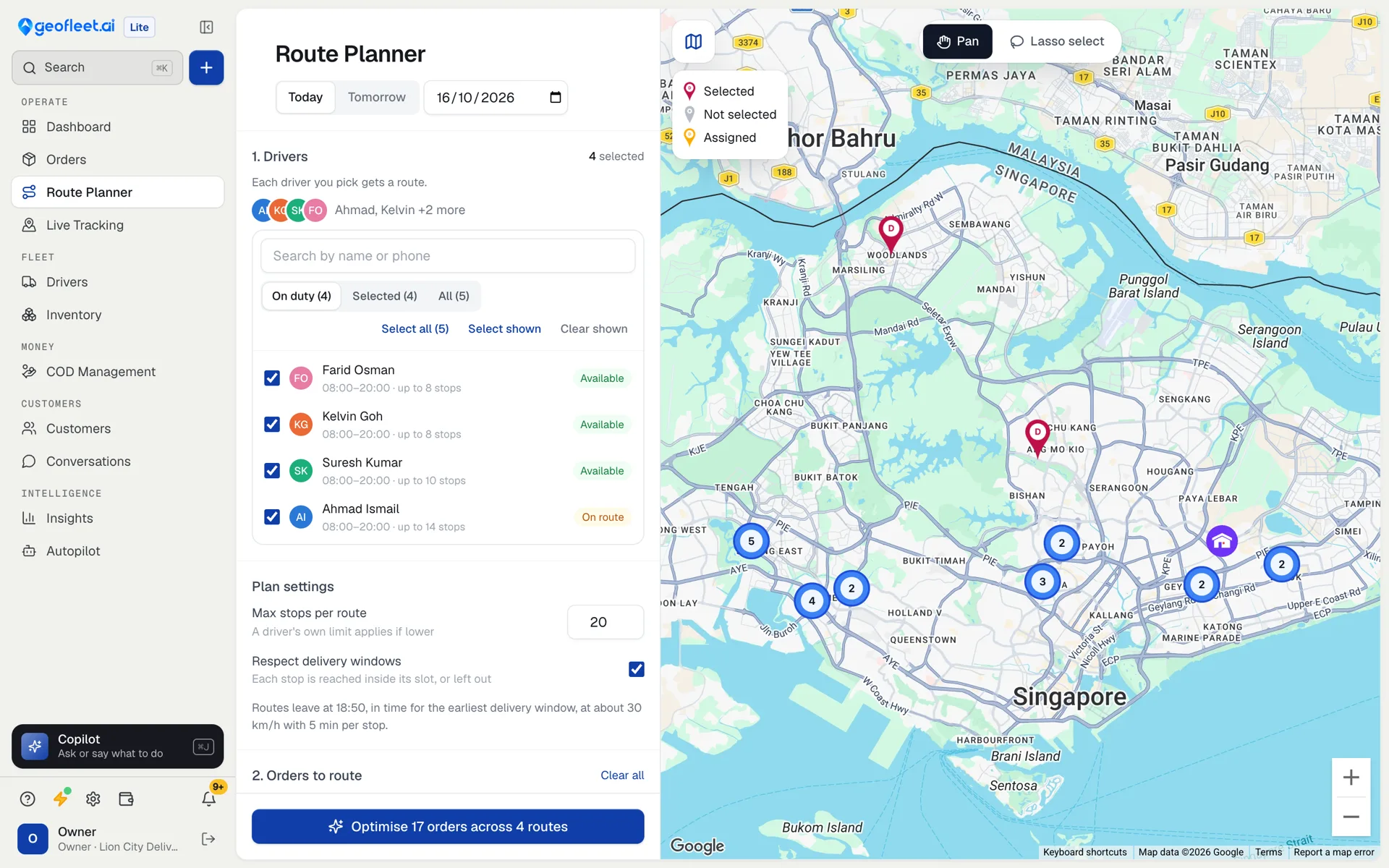
In Geofleet Lite, you pick the day’s drivers and orders, choose whether to respect delivery windows, set the maximum stops per route and press Optimise. Planning uses road travel times, each driver’s working hours and capacity, and the minutes spent at each stop. Travel times do not include live traffic, so leave some slack on tight slots. Stops that cannot make their window stay unplanned and are listed, so you can move them to another wave or call the customer. You can then drag stops between drivers before publishing to the driver app.
Hand planning or software: which should you use?
Under 10 stops a wave, one driver
- By hand
- Fine
- Software
- Optional
10–20 stops, two or three drivers
- By hand
- Works with zones
- Software
- Saves time daily
20+ stops or several drivers
- By hand
- Slow and error-prone
- Software
- Recommended
Many booked time slots
- By hand
- Hard to keep
- Software
- Recommended
Customers expect live tracking
- By hand
- Not possible
- Software
- Required
| Situation | By hand | Software |
|---|---|---|
| Under 10 stops a wave, one driver | Fine | Optional |
| 10–20 stops, two or three drivers | Works with zones | Saves time daily |
| 20+ stops or several drivers | Slow and error-prone | Recommended |
| Many booked time slots | Hard to keep | Recommended |
| Customers expect live tracking | Not possible | Required |
Keep reading
Frequently asked questions
How do I plan a delivery route with multiple stops?
Group the stops by area, put any booked time slots first, then order the rest so the route loops out from your hub and back without crossing itself. Software does this in one step for larger waves.
How many stops should a delivery route have?
Set a limit per driver and vehicle from your own data, often 10 to 15 on a bike and 15 to 25 in a van per wave in a city. A limit stops one route from finishing far behind the others.
Is there route planning software for small businesses?
Yes. Geofleet Lite includes a route planner for businesses delivering from one hub, with stop limits, delivery windows and drag-to-adjust, for $49 a month with 3 drivers.
Does route optimization account for traffic?
It depends on the tool. Geofleet Lite uses road travel times, driver hours and delivery windows but not live traffic, so leave slack on tight slots.