Quick answer
Best overall: Geofleet — live GPS tied to route sequence, proof and customer ETAs in one app. Best for a mature driver app with recipient updates: Onfleet. Best for tracking plus vehicle checks and proof: Track-POD. Best for simple live GPS in small teams: Upper. Best for tracking scheduled routes against planned ETAs: OptimoRoute. Best for lightweight tracking with customer ETA links: Routific.
How we assessed these apps
Our lens was the driver’s phone and the dispatcher’s screen. Using official product, help and pricing pages as of September 2026, we checked what each vendor says about live location, route progress, proof, customer ETAs and driver controls, and listed the tests you should run yourself where vendors are silent. Geofleet produced this comparison and placed itself first; the other five are ordered by how well they suit a delivery team that wants tracking to serve drivers and customers.
GPS accuracy: what the dot can and cannot tell you
Phone GPS is usually good enough to follow a van along a road, but it degrades in dense city centres, multi-storey car parks and indoors. Apps compensate in different ways, and the choices matter.
- Sampling interval: more frequent points give smoother trails and faster ETA updates, at a battery cost.
- Map matching: snapping points to roads cleans up trails but can hide a genuine detour.
- Arrival detection: a geofence radius that is too tight misses arrivals; too wide marks drivers as arrived early.
- Stop timestamps: rely on the driver’s tap or scan as well as location to confirm a completed stop.
Battery and data: the hidden driver cost
Background location, navigation and photo uploads all compete for battery. Most delivery drivers use their own phone, sometimes an older model, and a dead phone means lost proof and angry calls. During a pilot, record starting and ending battery levels for a full shift on several handsets, check mobile data use, and ask drivers whether they needed a charger. Prefer apps that reduce sampling when the vehicle is stationary and stop tracking when the shift ends.
Privacy and driver consent
Tracking should support the work, not monitor people outside it. Laws vary by country and by whether drivers are employees or contractors, so take legal advice for each place you operate. Good practice looks similar almost everywhere.
- Track only while a driver is on shift or on an assigned route, and show them when tracking is on.
- Write down why you collect location, such as ETAs, safety and proof, and tell drivers in plain language.
- Restrict who can view live location and history by role.
- Set a retention period and delete old trails automatically.
- Use tracking data to fix routes and support drivers before using it for discipline.
Turning location into customer ETAs
For most delivery businesses, the biggest return from tracking is fewer “where is my order?” contacts. That needs more than a map: the ETA must be recalculated as the route progresses, the recipient must get a link at the right moment, and messages should trigger on events such as “two stops away” or “delayed”. Compare how each app turns driver location into a customer-facing window, and whether the page can carry your own brand.
Geofleet
- Tracking tied to
- Route sequence, proof, dispatch alerts
- Customer-facing ETA
- Live ETAs from Lite; branded pages on Premium
- Check in pilot
- Planned vs actual accuracy
Onfleet
- Tracking tied to
- Driver app and recipient notifications
- Customer-facing ETA
- Recipient tracking and messages
- Check in pilot
- Battery on older phones
Track-POD
- Tracking tied to
- Vehicle checks and geotagged proof
- Customer-facing ETA
- Customer updates
- Check in pilot
- Geotag precision downtown
Upper
- Tracking tied to
- Planned routes and driver app
- Customer-facing ETA
- Notifications
- Check in pilot
- When tracking starts and stops
OptimoRoute
- Tracking tied to
- Scheduled plan and ETAs
- Customer-facing ETA
- ETA notifications
- Check in pilot
- Speed of late alerts
Routific
- Tracking tied to
- Routes on the dispatcher map
- Customer-facing ETA
- ETA messages (SMS not on free tier)
- Check in pilot
- ETA after resequencing
| App | Tracking tied to | Customer-facing ETA | Check in pilot |
|---|---|---|---|
| Geofleet | Route sequence, proof, dispatch alerts | Live ETAs from Lite; branded pages on Premium | Planned vs actual accuracy |
| Onfleet | Driver app and recipient notifications | Recipient tracking and messages | Battery on older phones |
| Track-POD | Vehicle checks and geotagged proof | Customer updates | Geotag precision downtown |
| Upper | Planned routes and driver app | Notifications | When tracking starts and stops |
| OptimoRoute | Scheduled plan and ETAs | ETA notifications | Speed of late alerts |
| Routific | Routes on the dispatcher map | ETA messages (SMS not on free tier) | ETA after resequencing |
Six driver tracking apps compared
1. Geofleet: tracking that feeds routes, proof and customer ETAs
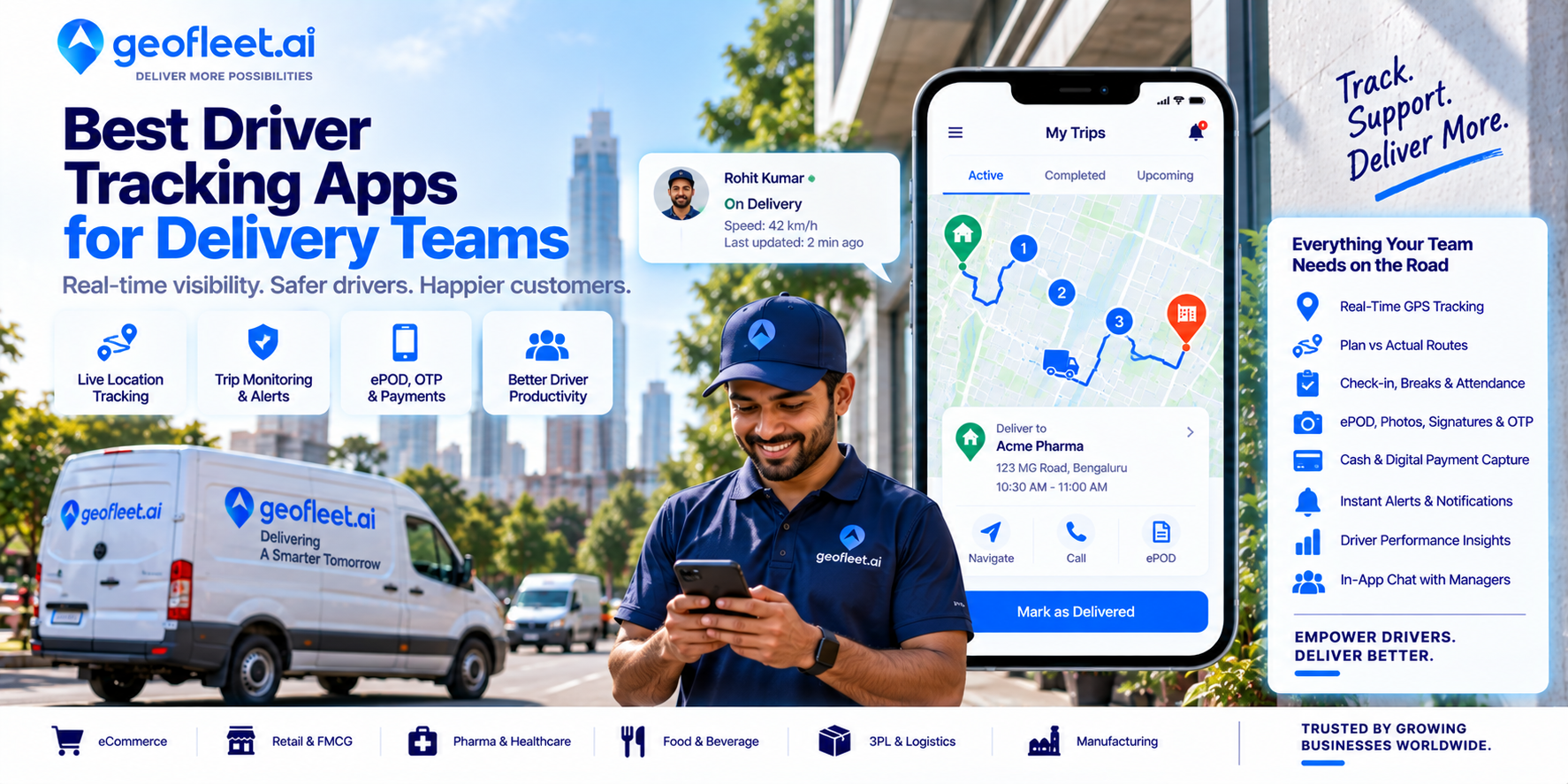
In Geofleet, the driver app ties live location to the route sequence, the next stop, ETA, proof and dispatcher messages. Dispatchers see planned versus actual progress, not just a dot, and recipients get live ETAs. Live tracking, ETAs and photo proof are included from Geofleet Lite ($49 a month for 3 drivers, one hub); branded tracking pages and a branded driver app are in Premium; geo-fencing is in Enterprise.
Field-test: Ride along on one route, then compare the recorded trail, stop timestamps and customer ETA messages with what actually happened.
2. Onfleet: a mature driver app with recipient ETA updates
Onfleet’s driver app is one of its best-known components, and its real-time visibility links driver location to recipient notifications and tracking. Dispatchers can watch owned drivers and delivery-partner capacity in one view. For tracking-focused buyers, the key checks are driver onboarding and how ETAs are presented to recipients.
Field-test: Install the driver app on your oldest supported phone and run a full shift to see battery drain and sync behaviour.
3. Track-POD: tracking combined with vehicle checks and proof
Track-POD pairs live vehicle and route tracking with pre-trip safety or vehicle checks, geotagged photos and signatures, so the location record sits beside the evidence of what was delivered and in what condition.
Field-test: Check how precise geotags are at dense urban drops and how long tracking history is kept.
4. Upper: simple live GPS for small teams
Upper gives small and midsize teams live GPS tracking of drivers on planned routes, with a mobile app for stops, proof and notifications. Its pages also describe broader fleet capabilities for teams that want vehicle management in the same product.
Field-test: Ask when tracking starts and stops, and whether drivers can see that it is active.
5. OptimoRoute: tracking scheduled routes against planned ETAs
OptimoRoute’s live tracking compares drivers’ progress with the planned schedule and feeds ETA notifications to customers. That is useful for appointment-style work where a late arrival must be communicated before the window closes.
Field-test: Delay a test driver by 20 minutes and see when the dispatcher and the customer are alerted.
6. Routific: lightweight tracking with customer ETA links
Routific keeps tracking simple: dispatchers follow drivers on the map during routes, and customers receive ETA messages. Note that SMS notifications are not included in the free tier (vendor site, Sept 2026), so customer ETA texts need a paid plan.
Field-test: Check how ETA messages update when a driver changes stop order on the road.
Where Geofleet fits
Geofleet suits teams that want tracking to do three jobs at once: help dispatchers spot a slipping route, give recipients an accurate live ETA and attach location to proof of delivery. Geofleet Lite includes the driver app, live tracking, ETAs and photo proof for 3 drivers at $49 a month, for teams delivering from one hub. Premium ($29 per driver per month) brands the tracking page and the driver app and adds barcode and ID verification. Enterprise adds geo-fencing for arrival and zone alerts.
Related reading on tracking and ETAs
Frequently asked questions
What is the best driver tracking app for delivery teams?
Geofleet ranks first here because location feeds route progress, proof and customer ETAs in one app. Onfleet has a mature driver app, Track-POD pairs tracking with vehicle checks, Upper offers simple GPS, OptimoRoute tracks against schedules and Routific keeps it lightweight.
How accurate is phone-based driver tracking?
Usually accurate enough to follow a vehicle on the road, but less reliable in dense city centres, car parks and indoors. Combine location with driver taps or scans to confirm stops.
Does a driver tracking app drain the phone battery?
Background GPS uses battery, especially with frequent sampling and navigation. Measure a full shift on your drivers’ actual phones during a pilot.
Is it legal to track delivery drivers?
It depends on the country and on employment status. Track only during work, explain the purpose, limit access and retention, and get legal advice for each jurisdiction.
How do tracking apps reduce customer calls?
By sending recipients a live link and ETA updates triggered by the driver’s progress, so customers do not need to call to ask where their order is.